
Overview
RenderNet is an AI tool that allows users to create and edit images. It offers a variety of features that make it easy for users to create realistic and professional-looking images. Some of the key features of RenderNet include:
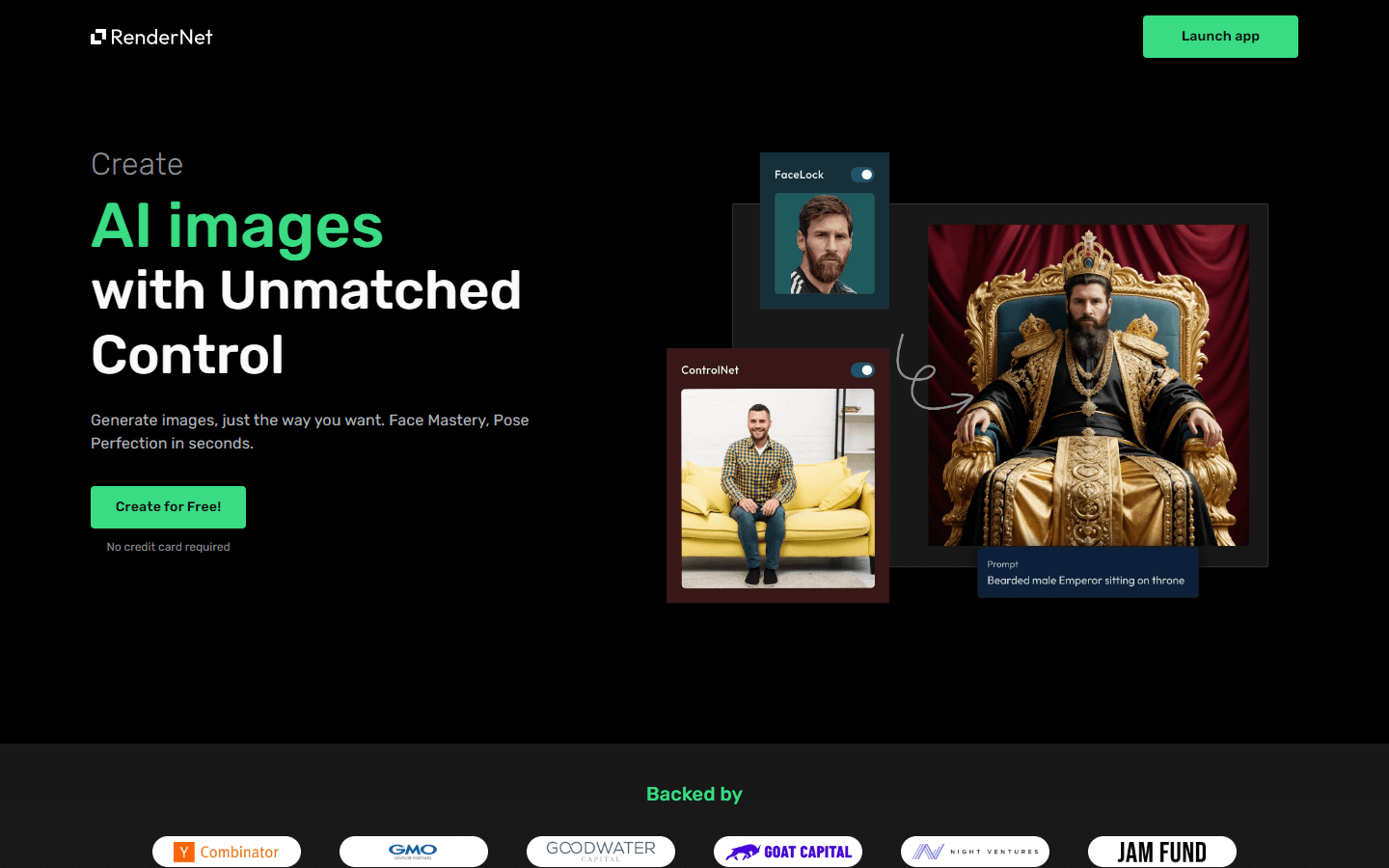
FaceLock: This feature allows users to upload a photo and create a realistic AI character. Users can then customize the appearance of the character, such as their hair, eyes, and clothing.
ControlNet: This feature allows users to set the composition and other aspects of the image. For example, users can control the lighting, the background, and the pose of the characters in the image.
RenderNet is free to use, making it a great option for both professional and amateur users. It is a powerful tool that can be used to create a wide variety of images, from product mockups to social media graphics.
Core Features
FaceLock: This feature allows users to upload a photo and create realistic AI characters with the same face.
ControlNet: This feature allows users to use source photos to set composition, outlines, character poses, and patterns.
Multi-model generation: This feature allows users to select multiple models and run the same prompt on all of them at once.
Use Cases
Creating social media graphics: Use FaceLock to generate an AI character representing your brand and ControlNet to set the scene and mood for different social media posts.
Generating product mockups: Upload a product image and use ControlNet to adjust the background, lighting, and pose to create various product mockups for websites or marketing materials.
Designing book covers: Use FaceLock to generate an AI character for the book cover and ControlNet to set the setting and mood, crafting an eye-catching and relevant cover design.
Developing concept art for games or animations: Utilize FaceLock to create diverse characters and ControlNet to define their poses, expressions, and environments within the game or animation.
Generating personalized avatars: Upload a photo with FaceLock and personalize the AI character with different styles, accessories, and backgrounds, creating a unique and customized avatar.
Creating storyboards for film or animation projects: Use FaceLock to generate characters and ControlNet to create various scenes and layouts, visualizing the story progression and flow.
Illustrating educational materials: Generate relevant characters with FaceLock and set informative scenes with ControlNet to enhance the engagement and understanding of educational content.
Designing custom clothing or accessories: Upload a photo of a plain garment and use ControlNet to add patterns, textures, and designs, creating unique and personalized clothing or accessory ideas.
Creating historical illustrations: Use historical figures' portraits with FaceLock and ControlNet to depict historical events or settings, bringing them to life for educational or entertainment purposes.
Generating personalized greeting cards or invitations: Utilize FaceLock to create AI characters representing the recipient and use ControlNet to set a celebratory background, creating unique and personalized greetings.
Pros & Cons
Pros
Easy to use: User-friendly interface with clear instructions.
Free to use: Accessible for both professionals and hobbyists.
Realistic image generation: Creates high-quality, realistic images.
Customizable characters: Adjust details like hair, eyes, and clothing with FaceLock.
Control over composition: Set the scene, lighting, and pose with ControlNet.
Multiple model generation: Generate different variations with a single prompt.
Wide range of applications: Useful for creating diverse visual content.
Sparks creativity: Offers potential for new ideas and concepts.
Educational tool: Enhances understanding through visual aids.
Fun and engaging: Provides a unique and interactive experience.
Cons
Limited editing capabilities: Lacks advanced editing tools for fine-tuning images.
Potential for misuse: Ethical concerns regarding manipulating real people's likenesses.
Bias in AI models: May generate results reflecting biases present in training data.
Reliance on internet connection: Requires a stable internet connection to function.
Learning curve: May require practice to master the nuances of the tool.
Copyright issues: Unclear guidelines around copyright ownership of generated content.
Overdependence on AI: May discourage development of traditional artistic skills.
Limited control over specific details: May not always generate precisely what the user envisions.
Accessibility for non-tech-savvy users: Interface may be challenging for users unfamiliar with technology.
Potential for addiction: Excessive reliance on AI-generated images could stifle creativity.
FAQs
Video Review
RenderNet Alternatives

Emojis.sh
AI Emoji Generator

Dreamwave AI
AI Headshots and more

Photo AI
Create beautiful AI photos and videos without a camera

Dzine AI
Controllable AI image and design studio

Aicado AI
AI Implementation Hub for Non-Technicals

Higgsfield AI
Cinematic AI video generator with pro VFX control

Shakker AI
Best Image to Image AI Generation Tool

Microsoft Designer
Stunning designs in a flash
![FLUX.1 [pro] logo](https://cdn.brouseai.com/logo/LjKDkTabCoBjQ9yqT998X.png)
FLUX.1 [pro]
State-of-the-art image generation with top of the line prompt following, visual quality, image detail and output diversity.

Exactly.ai
Ethical ai for creators

RunComfy
RunComfy: Top ComfyUI Platform - Fast & Easy, No Setup

Everneed AI
Everneed AI

Fotor
Online photo editor for everyone

HitPaw
Powerful Video, Audio, and Image Solutions Provider

Magic Studio
Make beautiful images with AI

AI Image Humanizer
Humanize AI-generated images while preserving their visible appearance

Lexica Art
Search over 10M+ Stable Diffusion images and prompts.

BlogBud AI
Generate SEO-optimized blog posts at scale

Stability AI
Activating humanity's potential through generative AI

SeedRouter
Access image, video, and language models via one API without monthly subscriptions

Epic Selfie
Selfies so Epic they will break the like button

Kittl AI
Transform Your Design Process

Hailuo AI
AI Video Generator from Text & Image

Google Nano Banana
Fast multimodal Gemini model for production
![FLUX.1 [dev] logo](https://cdn.brouseai.com/logo/B6GQOp69ZOm-Zte81GQnv.png)
FLUX.1 [dev]
A 12 billion parameter rectified flow transformer capable of generating images from text descriptions

Token360
One API for 80+ frontier AI models across text, image, audio and video.

Wondershare Virbo
Generate Engaging AI Videos in Minutes!

Dreamina AI
Dreamina AI - Text-to-Image and Video Creator

Robopost AI
Robopost AI generates post ideas for you with AI and posts/schedules them to your social media accounts.

Krea
A delightful AI-powered design tool for images & videos

Artisse
AI Photography App for Stunning Portraits & Photos

Writingmate AI
ChatLabs: All the Best AI Models in One Place

Diagram
Design tools from the future

Disney AI Poster Generator
Turn your pet or photo into a Disney Pixar character

Grok 2
Our newest AI assistant, powered by X

VEED.IO
AI Video Editor - Fast, Online, Free

APIFRAME
The Midjourney API for AI-Powered images generation.

Zawa
AI Branding Design Agent
![FLUX.1 [schnell] logo](https://cdn.brouseai.com/logo/gAATMVVzTB-BCugiC3hVp.png)
FLUX.1 [schnell]
The fastest image generation model tailored for local development and personal use

Playground AI
Create and Edit Images like a pro without being one.

Leonardo AI
AI Image Generator for Art, Video & Design

Crypko
AI Anime Character Generation

Wondershare AI
Wondershare AI Creativity Ahead

Pixlr
AI Image Generator and AI Design tools

Apple Intelligence
AI for the rest of us

Neurona AI Image Creator
AI image generator; AI art generator; face swap AI

Clipdrop
Create Stunning Visuals in Seconds

Midjourney
Create AI generated images from a text prompt

FlexClip
Easily create and edit videos for the brand, marketing, social media, family, and any other purpose.

Hautech.ai
Create stunning fashion photos with AI

Vheer
Free-to-use image generator

AI Anime Generator
Create high quality anime using ai in seconds.

Pebblely
Beautiful product photos in seconds

Dora AI
Sites beyond imagination, one prompt away.

Pippit AI
Free AI video generator for e-commerce and social

Adobe Firefly
Free Generative AI for creatives

InstaPhotoAI
Studio Quality Photos, using AI, within seconds

Hyperspace
Get Access to 1000+ AI-models with One Subscription

Swapface
A real-time face changer for creating all kinds of deepfake

CandyIcons
Generate app icons with AI

LobeChat
Unleash Your Potential with LobeChat's AI Assistants

AIEasyPic
Simplifying AI Image Generation
Featured

WasItAI
Detect whether an image was AI-generated or camera-captured.
SeedRouter
Access image, video, and language models via one API without monthly subscriptions

Genjutsu
Transform one video into endless variations with AI.

CommentWatchDog
Hide and delete spam comments on Facebook and Instagram ads

Answer Engine Optimization
See how AI answer engines mention and cite your website.

AI Overviews Tracker
Track website mentions and citations across six AI engines

C2PA Remover
Check and remove C2PA content credentials

Claude Mark Remover
Remove hidden Claude marks and humanize AI-generated text.

Adobe Firefly Background Remover
AI tool that removes photo backgrounds and outputs a transparent PNG — free to use.
Token360
One API for 80+ frontier AI models across text, image, audio and video.
AI Image Humanizer
Humanize AI-generated images while preserving their visible appearance