
Hailuo AI
AI Video Generator from Text & Image
Overview
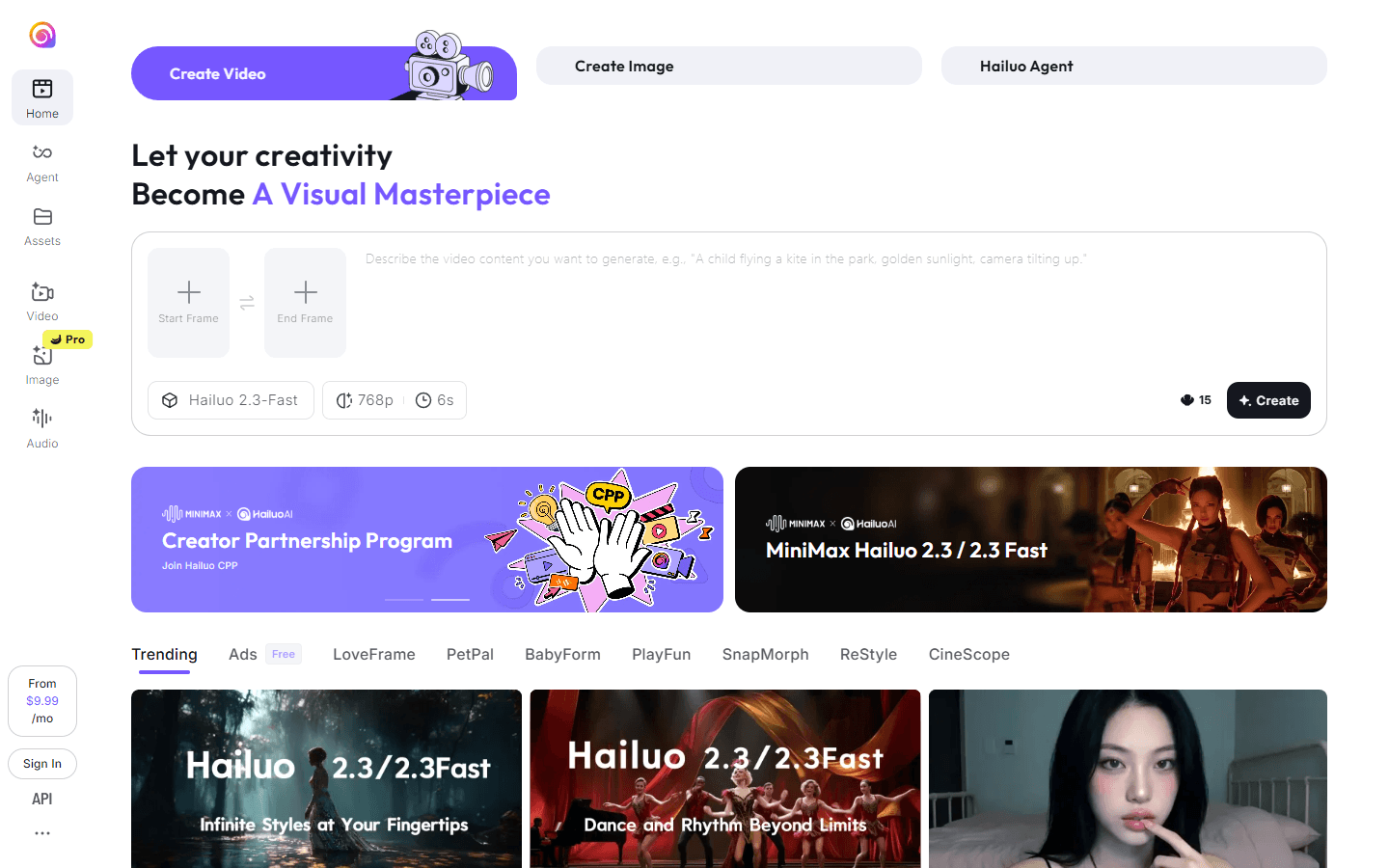
Hailuo AI (https://hailuoai.video/) is an AI-driven video creation platform that turns text prompts and still images into share-ready video content. Built for creators, marketers, and storytellers, Hailuo AI combines template-driven workflows, advanced generative models (including Hailuo 2.3 and Hailuo 2.3-Fast), and a MiniMax agent to help you iterate on prompts and styles quickly.
Users can start with a text prompt, upload a reference image, or pick a template such as LoveFrame, PetPal, CineScope, or SnapMorph to speed production. How it works: you provide a script, scene description, or character image; the platform's text-to-video and image-to-video pipelines synthesize motion, camera moves, and emotional expression; subject-reference options let the system maintain consistent character appearance across shots.
Hailuo AI also supports style transfer, multi-screen layouts, and export presets tuned for social channels. The MiniMax agent is a guided assistant that recommends phrasing, model settings, and templates so non-technical users get professional results faster. What makes it unique: Hailuo AI emphasizes emotional authenticity and subject continuity more than many competitors, producing videos with natural facial expression dynamics and coherent character identity across scenes.
The availability of a Fast model (Hailuo 2.3-Fast) lets teams iterate in minutes while higher-quality modes prioritize visual fidelity for final exports. A rich template library and genre-focused modes (advertising ads-free templates, cinematic CineScope, playful PlayFun templates) let users produce niche formats without complex editing. Platform and delivery: Hailuo AI is accessible via web and mobile apps (iOS, Android), with in-app credits and optional subscription tiers for power users.
Outputs include MP4 exports, social aspect ratios, and resolution options up to platform-supported limits. The service balances ease-of-use with advanced controls like duration, frame pacing, and reference-based consistency so both hobbyists and professionals can integrate Hailuo AI into content pipelines. For more information, examples, and to try the tool, visit https://hailuoai.video/ and explore templates, model comparisons, and tutorial guides to accelerate your AI video production.
Core Features
- Generate videos from text prompts with cinematic camera motion
- Convert photos into dynamic image-to-video scenes quickly
- Maintain consistent characters using subject-reference mode
- Switch between Hailuo 2.3 and 2.3-Fast for quality or speed
- Choose from curated templates like CineScope and PetPal
- Use MiniMax AI agent to optimize prompts and settings
- Export optimized formats for social platforms and ads
- Adjust duration, resolution, and style transfer parameters
Use Cases
- Create social ads and short promo videos for products
- Turn short stories into animated visual scenes
- Produce character-driven UGC and influencer clips
- Convert travel photos into dynamic highlight reels
- Generate training micro-videos for e-learning modules
- Create playful pet or toy videos for social sharing
- Prototype concept scenes for previsualization
- Make cinematic teasers for indie game trailers
- Localize marketing creatives with quick style variants
- Produce short-form vertical videos for Reels and TikTok
Pros & Cons
Pros
- Fast iterations with Hailuo 2.3-Fast
- Text-to-video and image-to-video in one tool
- Subject-reference ensures consistent characters
- Rich template library for quick starts
- MiniMax agent helps craft better prompts
- Export presets for social platforms
- Mobile and web access for flexible workflows
- Good balance of speed and visual quality
- Multi-language interface and platform support
- Template categories for targeted results
Cons
- Free credits are limited
- High-quality exports consume more credits
- Occasional generation artifacts in complex scenes
- Some advanced features behind subscription
- Watermark on free or trial outputs
FAQs
Video Review
Hailuo AI Alternatives

Animon AI
Create anime videos for free

Wan AI
Generate cinematic videos from text, image, and speech

Wondershare Virbo
Generate Engaging AI Videos in Minutes!

Pippit AI
Free AI video generator for e-commerce and social

Viggle AI
Remix anyone into viral meme videos

Dreamina AI
Dreamina AI - Text-to-Image and Video Creator

Zawa
AI Branding Design Agent

Vmake
AI Social Video Studio

Higgsfield AI
Cinematic AI video generator with pro VFX control

Leonardo AI
AI Image Generator for Art, Video & Design

Wondershare Filmora
Edit as an Expert with Filmora AI

MindVideo AI
Free text-to-video maker with 4K AI effects

Token360
One API for 80+ frontier AI models across text, image, audio and video.

RunComfy
RunComfy: Top ComfyUI Platform - Fast & Easy, No Setup

Google Veo 3
Fast, realistic text-to-video with native audio

Dzine AI
Controllable AI image and design studio

AI Influencer Generator
Sceneform.ai is an AI platform for creating realistic virtual influencers, UGC ads, talking avatars, and short-form social videos at scale.
Featured

AI Overviews Tracker
Track website mentions and citations across six AI engines

WasItAI
Detect whether an image was AI-generated or camera-captured.

Claude Mark Remover
Remove hidden Claude marks and humanize AI-generated text.

Answer Engine Optimization
See how AI answer engines mention and cite your website.
Token360
One API for 80+ frontier AI models across text, image, audio and video.

Referent
AI legal agents for law firm operations

RemoveAILabel
Remove AI labels and watermark traces from images and videos

CommentWatchDog
Hide and delete spam comments on Facebook and Instagram ads

AI Image Humanizer
Humanize AI-generated images while preserving their visible appearance

C2PA Remover
Check and remove C2PA content credentials